
Receive orders
In the very beginning of BikeRunner, orders were only sent on email. Then we added sms. Now we have the Runner app, and in there you now get a push notification when there is a new order for you. So please make sure you have accepted notifications from the app.
The orders that are available in your area will be shown here:
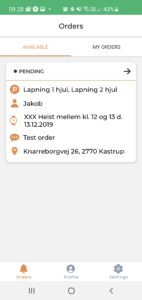
If you click on the order, you can read more about it.
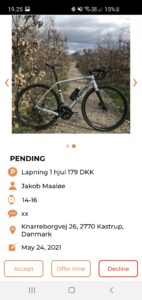
It is quite different how much info a customer includes in the order. Sometimes they are not by the bike when they make the order, and therefore cannot add pictures of the bike and tire size. If no one takes the order (lacking info), BR will ask customer and update the order with more info. But you are welcome to accept it anyways and write in the accept message that you need pictures before you come.
They also write wishes of deadline, address and comment. Once you have accepted the offer, you will get the customers contact info (email and phone number).
Accept
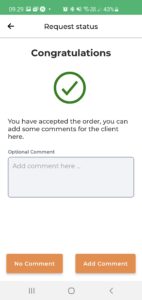
If you accept an order –
- It is moved to “My orders”
- Customer gets an email+sms with your comment and your contact info and the time you have chosen (you can choose a date + time and a “flexibility”. So if you choose 15/12 12.00 – flexibility 30 min – that means you can come between 11.30 and 12.30).
- BikeRunner is informed you have taken the order.
Decline
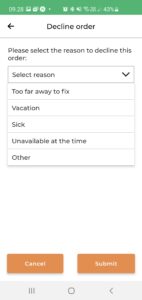
If you have declined an order, we know you are not available. If you have just not answered on an order, we might contact you and ask if you have seen it, if you can give and offer etc – if no one has taken it.
When you click decline we ask why. The only reason why we ask why is to keep statistics that can help us to match orders.
“Offer time”
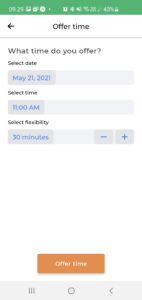 You should use this function when you want to do the order – but you are not able to do it within the deadline. BikeRunner.dk communicates on the website that “if you order before 10 am, we can usually fix your bike before the day is over”. So if the customer is asking for faster than that, it’s definitely fair enough to make an offer of a later time.
If no Runner has accepted it to the time, after 30 min your offer is sent to the customer on email and sms. They can then accept or decline it. You will be notified on their response on a notification in the Runner app. If accepted – the order will move to your “My orders”.
Please be aware that any Runner can just accept the order in the meantime, when your offer is pending.
You can also use this function if the order is outside of your zone, and you want a transport fee to take it. Then you can add this info in the comments section to the customer – ergo they will then decide if they want to accept both the time you have suggested, and the extra cost.